
The Fastest WordPress Themes for SEO in 2026: Speed That Actually Ranks
Picture this: you’ve poured your heart into a piece of content. The research is impeccable, the writing is crisp, and the value is undeniable. You hit publish, wait for the traffic to roll in… and nothing. Or worse, a trickle that bounces almost immediately.The culprit? Speed.In 2026, Google doesn’t just prefer fast websites—it demands them. And the foundation of that speed starts with your theme. Choosing one of the fastest WordPress themes isn’t just a technical nicety; it’s a competitive necessity. This guide cuts through the marketing fluff to show you exactly which themes deliver and why.
Why Speed Is SEO’s Best Friend
Before we dive into the themes themselves, let’s get one thing straight: speed isn’t just about user experience. It’s a direct ranking factor.
Google’s Core Web Vitals—Largest Contentful Paint (LCP), Interaction to Next Paint (INP), and Cumulative Layout Shift (CLS)—are now baked into how search engines evaluate your site. In fact, there are rumors that Google will roll out “Performance Rank Weighting v2” in 2026, where themes scoring below 90 on mobile Core Web Vitals will tank in rankings.
The average WordPress site loads in about 2.5 seconds on desktop. On mobile, with simulated throttling, that number jumps to a staggering 8 seconds or more. Every second of delay increases bounce rates and kills conversions.
The good news? The right theme can slash those numbers dramatically. Let’s look at what separates a speed demon from a bloated disaster.
What Makes a Theme Truly Fast?
Not all “fast” claims are created equal. Here’s what actually matters:
Lightweight Codebase: The best themes ship with under 50KB of front-end resources. They eliminate unnecessary scripts, heavy animations, and bloated features.
No jQuery Dependency: In 2026, themes still relying on jQuery are outdated. The fastest themes have abandoned it in favor of Vanilla JS, resulting in near-instant interaction times on mobile devices.Mobile-First Architecture: With Google prioritizing mobile-first indexing, your theme must be optimized for mobile performance from the ground up.
Smart Asset Loading: The best themes use code splitting to load only the JavaScript and CSS needed for each specific page.
SEO-Ready Code: Proper heading structures, schema markup, and clean HTML5 make it easier for search engines to crawl and understand your content.
Now, let’s meet the contenders.
The Heavyweight Champions: Fastest WordPress Themes For SEO Compared
1. GeneratePress – The Pure Speed King
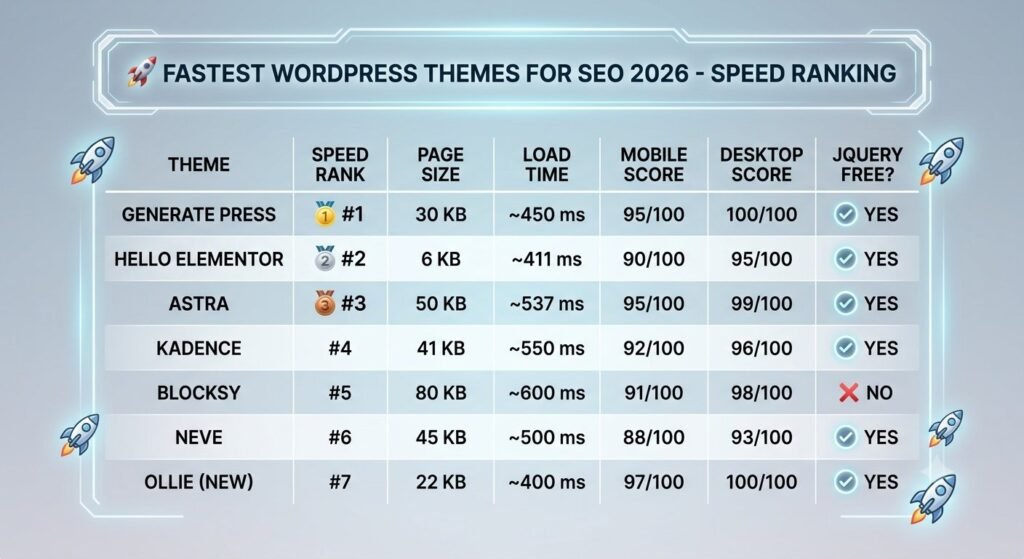
If speed were an Olympic sport, GeneratePress would be on the podium every single time. With a front-end footprint of roughly 30KB, it’s one of the smallest and fastest themes available. On a minimal installation without additional plugins, you can regularly achieve 95-100 on desktop PageSpeed scores.
GeneratePress earns an estimated speed score of A-, making it the benchmark against which other themes are measured.Best for: Developers, SEO professionals, and performance-obsessed builders who want the absolute lightest foundation.
The Trade-Off: Limited design polish out of the box. You’ll need to put in more effort for visually complex sites.
My Take: GeneratePress is the theme I recommend when a client says, “I don’t care about anything except speed.” It’s a blank canvas that lets you build exactly what you need without carrying dead weight.
2. Astra – The Popular Powerhouse
Astra is the most widely installed non-default WordPress theme in 2026, with over 1 million active sites. And for good reason. It loads at 537ms on GTmetrix with a 99 mobile PageSpeed score—the fastest combination of any general-purpose theme.
The theme adds less than 50KB to your page size and loads in under 0.5 seconds out of the box. Astra has also dropped jQuery entirely, cutting load times significantly.
Best for: Bloggers, small businesses, agencies, and general-purpose websites.
The Trade-Off: Astra’s payload is slightly heavier than GeneratePress at roughly 50KB vs. 30KB. Some critics in 2026 argue it’s becoming bloated compared to newer FSE themes, with a payload of 120KB+ in some configurations.
My Take: Astra is the safe bet. It’s fast enough for 99% of use cases, comes with hundreds of starter templates, and works with every major page builder. For most site owners, it hits the sweet spot between speed and convenience.
3. Kadence – The Best of Both Worlds
Kadence sits right in the middle—better design flexibility than GeneratePress, better performance than most feature-rich themes. It achieves an LCP of ~1.4s and a CLS of near zero (0.02) in 2026 benchmarks.
Kadence consistently scores above 90 on Google PageSpeed Insights (desktop) with default settings. Its total page size is around 41KB.
Best for: Users who want strong design capabilities without sacrificing speed.
The Trade-Off: While excellent, Kadence doesn’t quite match GeneratePress’s raw speed numbers.
My Take: Kadence is my go-to for projects that need both performance and visual polish. The header/footer builder is among the best in the free theme space, and Kadence Blocks dramatically extends the block editor without needing Elementor.
4. Neve – The Mobile-First Specialist
Neve is a mobile-first, AMP-ready theme that consistently delivers sub-second load times. Its lightweight codebase and small size ensure minimal overhead and lightning-fast load times.
Best for: Agencies, freelancers, and performance-focused sites.
The Trade-Off: Neve earns an estimated speed score of B-, which is solid but not top-tier compared to GeneratePress or Astra.
5. Hello Elementor – The Minimalist’s Dream
If you’re committed to Elementor, Hello Elementor is the obvious choice. It’s virtually a blank slate with virtually no bloat or default styling. The base page size is just 6KB, and it loads in 411 milliseconds.
Best for: Elementor power users who want absolute control.
The Trade-Off: You’re locked into the Elementor ecosystem. If you ever want to switch builders, you’ll need to rebuild your site.
6. Blocksy – The Feature-Rich Contender
Blocksy consistently delivers impressive performance, with clean installs hitting 98% on Google PageSpeed Insights (Desktop) and staying between 91-95% on Mobile. Page weights are under 80KB with a 95 PageSpeed score.
Blocksy was built from the ground up using React, Webpack, and Babel, with code splitting ensuring the site only loads the JavaScript needed for each page.
Best for: Users who want feature-rich design capabilities with strong performance.
The Trade-Off: Blocksy still uses jQuery in 2026, which some developers consider outdated. It’s also slightly heavier than GeneratePress, with a front-end CSS bundle of 50-70KB gzipped.
7. The New Guard: Ollie and Frost
For the truly performance-obsessed, 2026 has brought new contenders. Ollie (by Mike McAlister & Automattic) ships with just 22KB of CSS and JavaScript total—perfect scores, zero bloat. Frost (by WP Engine) is the corporate/enterprise king, built for headless architecture if you ever need it.
These are Full Site Editing (FSE) block themes built on theme.json and template parts, representing the future of WordPress theming.
The Truth About “Free” vs. “Premium”
Here’s something most guides won’t tell you: the free versions of these themes are genuinely excellent.
Astra, GeneratePress, and Kadence all offer capable free versions that deliver 90% of the performance benefits. The premium versions unlock additional features—more starter templates, advanced header/footer builders, and WooCommerce enhancements—but they don’t necessarily make the theme faster.
In fact, adding too many premium features can actually slow things down. The key is to use only what you need.
The Hidden Cost of Bloated Themes
Let’s talk about what happens when you choose the wrong theme.
A study measuring sites using Google PageSpeed Insights on April 19, 2026, found that optimized custom sites had an average mobile PageSpeed score of 89.9, while template demo sites averaged just 53.9. Only 45% of optimized custom sites passed Core Web Vitals on lab data, compared to just 10% of template demos.
The difference? Clean code, minimal bloat, and performance-first architecture.
Themes like Avada, Divi, Enfold, Jupiter, and BeTheme have been flagged as F-TIER in 2026 evaluations—abandon immediately. They’re relics of a past era when “all-in-one” was a selling point. Today, they’re just dead weight.
How to Choose the Right Theme for Your Site
Here’s my framework for making the right choice:
Ask yourself these questions:
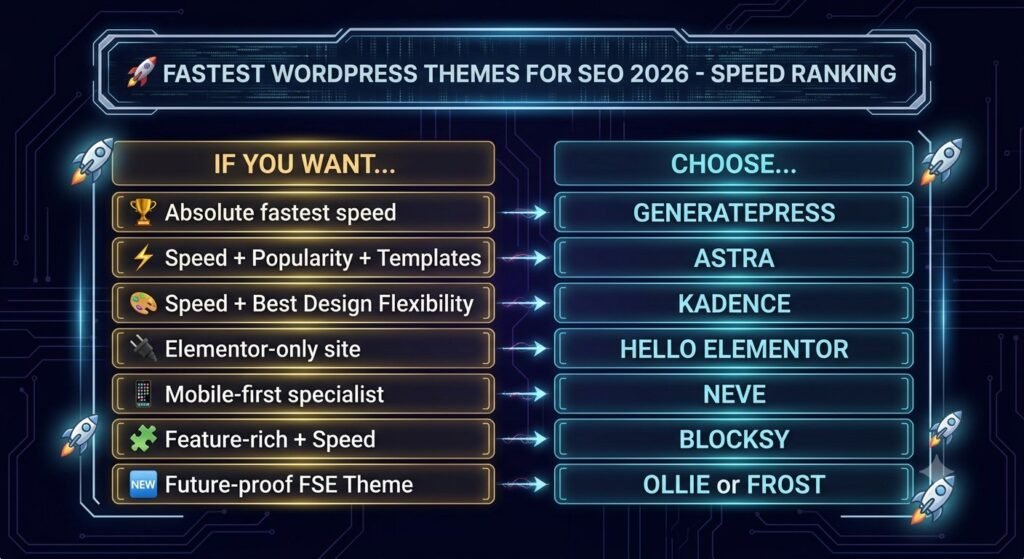
- What’s your priority? If it’s pure speed above all else → GeneratePress. If it’s speed plus convenience → Astra. If it’s speed plus design flexibility → Kadence.
- What page builder are you using? Elementor users should strongly consider Hello Elementor. Gutenberg users will love Kadence or GeneratePress with GenerateBlocks.
- What’s your technical skill level? Beginners will appreciate Astra’s starter templates. Developers will love GeneratePress’s hooks and clean code.
- What’s your budget? The free versions of these themes are genuinely excellent. Start there and upgrade only if you need specific premium features.
One final piece of advice: Even the fastest WordPress theme won’t save you from poor hosting, unoptimized images, or too many plugins. Speed is a system, not a single component.
Pair your theme with quality hosting, use a caching plugin like WP Rocket, optimize your images, and keep your plugins to a minimum. That’s how you build a site that actually ranks.
Your Turn
Now I want to hear from you: Which of these fastest WordPress themes have you tried? Are you team GeneratePress for raw speed, or do you prefer Astra’s ready-made convenience? Drop a comment below and let’s talk about what’s working for your site.
And if you found this guide helpful, share it with someone who’s still struggling with a bloated, slow-loading theme. They’ll thank you later.
Ready to make the switch? Check out the official WordPress theme directory to get started with any of these themes today.